
8 Key Points to Securing your Saas Applications
Abstract
Are you creating a security system for a SaaS application? This article is here to help! It lists the important questions to ask from the beginning of your project to avoid security breaches or functional limitations that will hold you back later.
Introduction
Ideally, the security of your SaaS application should combine both strength and flexibility:
System strength will guarantee application security by:
- Controlling user access within the limits of their subscription
- Assuring data confidentiality between the users sharing the application
- Eliminating security breaches at protecting you from exterior attacks
System flexibility will contribute to the development of your business by:
- Facilitating the evolution of your business model and the creation of your offer
- Responding to client needs related to user management (see below)
- Supporting scalability: optimizing performance and simplifying administration of large numbers of users and secured components
This article lists the technical and functional specifications allowing you to attain both goals. It will help you conceptualize the security of your SaaS application, taking into account important constraints from the beginning of your project. You will thus be able to cover short terms needs, while at the same time anticipation any future evolutions necessary to the development of your business.
Administration: centralize or delegate?
Initially, you may be managing users and access rights yourself.
As the volume of users increases, you – and your clients – may wish to delegate certain administration rights so that your clients are managing their users and accounts themselves.
If this is the case, you will need:
- An administration interface accessible to non-technical users. You can then delegate user administration to local business managers
- This administration interface must, of course, be accessible via the web, and offer all required functionalities (account management, assignment of groups and access rights, visibility and control of security data…)
Read more:
If you develop a multi-tenant application (the same instance of the application is used by multiple clients), you will restrain client administration rights to their own user accounts: you don’t want one client to be able to modify another client’s accounts! More generally, you can restrict delegated access rights in three ways:
- Limit user account administration to a client, or a subset of the clients’ users. For example, a sales manager would only be able to define the access rights of their sales team
- Limit the types of administration operations. For example, a business manager would not be able to create new user accounts. They would, however, be able to assign access rights to existing accounts
- Limit administration to certain application. For example, an HR manager could give access rights to the pay module, but not to the stock management module.
With all these possible scenarios, you need to plan a flexible system, allowing you to delegate several levels of administration rights, according to your clients’ internal organization and needs.
Read more:
Deployment in the Cloud
- Adapt the system to the chosen platform. In the case of Windows AZURE, you must take into account the specifications of the operating system and SQL Azure.
- Adapt the scalability and sizing of your server resources according to the needs of your SaaS application
Pay-per-use Billing and Payment
If your business model is based on a pay-per-use model, or includes temporary use rights, you will likely need to anticipate:
- User accounts with a limited time span
- An API enabling collaboration with a billing program to automatically update the expiry date of each account
- A user interface that allows the sales team or helpdesk to modify this information – for example, the treatment of unique cases or errors, taken immediately into effect for the user
Read more:
Single Sign-On: a must for software suites
If you offer a SaaS application suite:
- A single user account should have access to all the associated applications. The user should be able to freely pass from one module to another
- This should also be true for Web Services = automatic authentication for the user
- By default, the user logs in once and can then access all applications without re-entering their credentials (Single Sign-On)
Read more:
What if your users could reuse existing accounts?
By default, you will create a new account for each user that needs access to the system.
The problem with this is that a user will already have multiple accounts to remember.
If you have corporate clients, they may wish to reuse their existing user accounts
(for example, their Windows accounts). Your access control system should therefore permit giving these
accounts access rights to your applications.
Read more:
Anticipate changes in your business model:
An access control system is often tied to the business model (pay-per-use or perpetual license) and to the software delivery model (Saas or on premise)
Depending on your company’s strategy and the evolution of the market, your initial go-to-market strategy may be filled out by other models (for example, to serve new client categories or increase your line of products).
A flexible security system will allow for this type of evolution.
Here are several of the most pertinent models your company may want to look at:
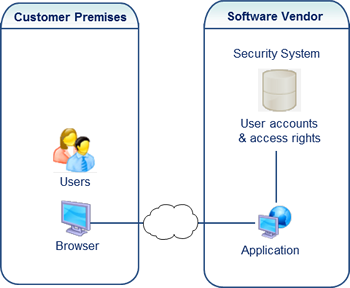 |
Case 1: Default SaaS model. Customers pay to use your application on a time-limited, recurring basis. Business model: pay-per-use |
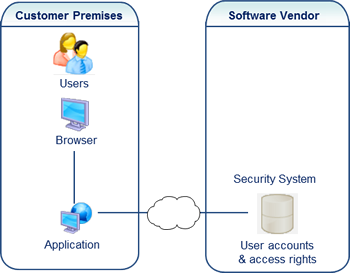
Case 2: For security or technical reasons, customers may request that you install the application in their environment. Users access it via LAN or Internet. Business model: pay-per-use |
 |
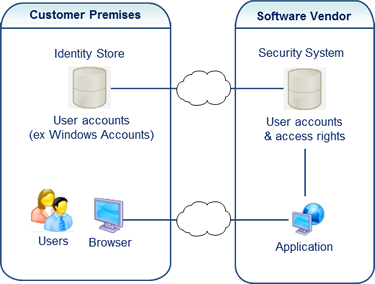 |
Case 3: Clients wish to reuse their user accounts (for example, their Windows accounts). The access control system should therefore be able to give existing accounts access to your SaaS applications. Business model: pay-per-use |
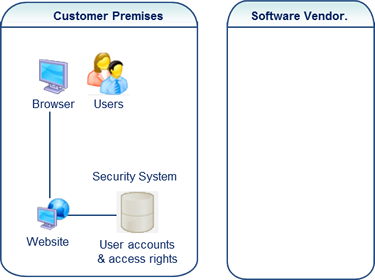
Case 4: Classic software delivery model. The client owns a copy of the application. They manage access rights themselves. The software vendor can add this model to their catalogue (in addition to a SaaS model) to increase their product offering. The access control system should be easily deployed to clients (simple and sound administration tools, completed documentation…). For all that, this type of deployment does not prohibit a pay-per-use model. For that, you will need a system that manages license keys on a time-limited basis. Business model: pay-per-use or perpetual license |
 |
Reliability and Performance:
The administration interface must be conceived to manage large numbers of users and access rights
(to guide the administrator performing operations and searches, optimize the response time of the security
repository…).
When the application is put in to production, the user authentication process and the calculation of their access
rights must be optimized to avoid long wait times. For example, a system that needs to access the security repository
each time a user opens a new page has a greater chance of performance issues when the number of users and page views
increases.
Protection against Security breaches:
Since a SaaS application is accessible via the internet and manages client data, it is necessary to create a system that will not be vulnerable to the following types of the most common attacks:
Unauthorized access to security data:
- Security data should not be readable by direct SQL access. You should require a connection via the SaaS application or via the administration interface to read and modify this data.
- Sensitive data like passwords should be encrypted.
Denial-of-service: your system should include protection against attempts to make it unavailable to customers by saturating it with numerous logon requests.
Unauthorized administration operations: a user could discover how to access your administration interface or the APIs that manage your security. You need to include protection that blocks giving illegal access rights to user accounts.
Interception of confidential information:
- Between the client browser and the web server (Support for SSL/HTTPS protocols, encryption of communications between the browser and the web server…).
- Between the .NET components inside the application.
Password cracking: the system should allow you to define a sophisticated Password Policy to protect against password cracking.
Packet sniffing: the system should include protection against the capture of data packets to find passwords or security tokens in transit over the network. A hacker could steal these tokens to make system calls as though they were a user.
SQL injection:
The access control system probably contains search fields – for example, to find a user account. You need to pre-arm this system against SQL injections, which consist of inserting parts of SQL orders in the search, with the goal of consulting confidential information, or illegally changing the security data.
Read more:
Make or buy?
Timeframe is key: certain functionalities mentioned above are very complex. To put them into
place will require a significant time commitment and skilled developers. If you are working in a limited timeframe,
it will be more profitable to use a ready-to-use access control solution.
Risk management: a ready-to-use solution will limit short-term risks (cost and time overruns, bugs and security
breaches), but you will be exposed to other risks for which you will need to cover:
- Evolution: consult the history and past versions of the solution: does it follow the technical evolutions of the market; are new versions published regularly, and most importantly, recently (risk of obsolescence)?
- Product and support quality: choose a stable and well-deployed solution, for which you can consult the reviews of other users
- Longevity: what will happen if the solution provider disappears? Is the solution delivered with its source code? Does the provider propose an escrow agreement (if the provider terminates activity, they will send a copy of the source code to all clients)?
Why not combine all these advantages? Certain providers are attentive to their users’ needs when choosing how to continually evolve their application with the market. In this case, you will benefit from the advantages of a standard solution (more stable and complete at a lower cost) while being able to influence future development to better cover your specific needs. Ask to see the product roadmap and verify if the provider knows how to take into account user suggestions.