
Business Application Security
Secure Multiple Technologies - Visual Guard Public Mode
VG Identity Server exposes Web Services to secure multiple technologies with the same system
Access Control Life Cycle
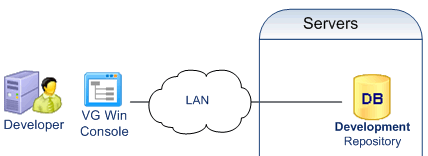
- Development
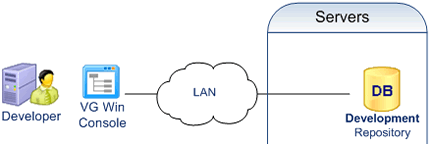
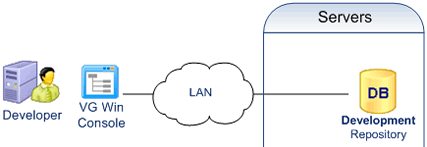
Developers define permissions with the VG Win Console.
Permissions are stored in a development repository.
Developers deploy the permissions into production with a VG utility
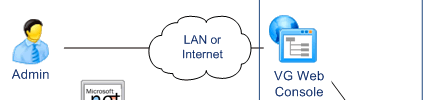
- Administration
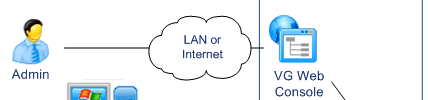
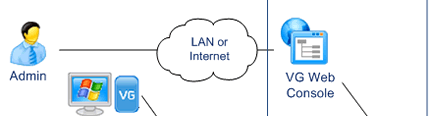
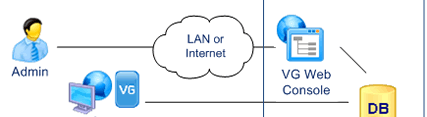
Administrators manage Users and grant them permissions.
They update the production repository with the VG Web Console
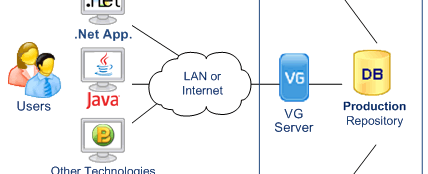
- Enforcement
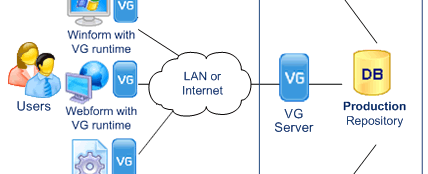
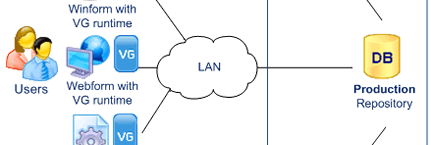
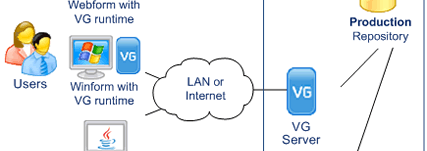
VG Identity Server exposes Web Services for User Authentication and Access Control.
Applications call VG Web Services to verify the user identity and check his access Privileges.
Each operation performed by the user is logged in the VG Repository.
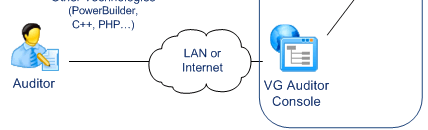
- Audit
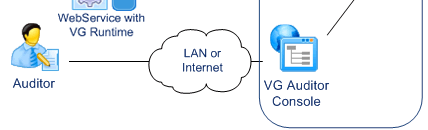
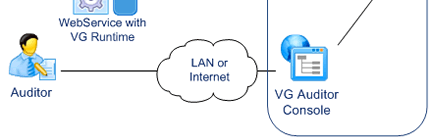
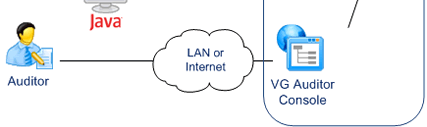
Auditors use a specific application provided with VG.
They can control user attributes, roles and privileges across multiple systems. They can also review user operations.
Notes
- Any Windows or Web application capable of SOAP calls or HTTP Requests is supported.
- Applications do not need a direct access to the database.
- Neither do the Administration Console or the Auditor Application.
- Users, Administrators and Auditors can operate from any location with Internet Access
Applications with no direct access to the security data store
Visual Guard Private Mode
.NET applications with no direct access to the repository, communicating with the VG Identity Server
Access Control Life Cycle
- Development
Developers define permissions with the VG Win Console.
Permissions are stored in a development repository.
Developers deploy the permissions into production with a VG utility
- Administration
Administrators manage Users and grant them permissions.
They update the production repository with the VG Web Console
- Enforcement
End-users log in to the .NET application.
The VG runtime calls the VG Identity Server to verify the user identity. The VG Identity Server sends the user permissions back to the VG runtime The VG Runtime enforces user permissions by dynamically changing the application.
- Audit
Auditors use a specific application provided with VG.
They can control user attributes, roles and privileges across multiple systems. They can also review user operations.
Notes
.NET applications directly accessing the security data store
Visual Guard Basic Mode
The VG Identity Server is not installed in this configuration.
Access Control Life Cycle
- Development
Developers define permissions with the VG Win Console.
Permissions are stored in a development repository.
Developers deploy the permissions into production with a VG utility
- Administration
Administrators manage Users and grant them permissions.
They update the production repository with the VG Web Console
- Enforcement
End-users log in to the .NET applications.
The VG Runtime queries the VG Repository to verify user identity.
The VG Runtime retrieves the user permissions and enforces security by dynamically changing the applications.
- Audit
Auditors use a specific application provided with VG.
They can control user attributes, roles and privileges across multiple systems. They can also review user operations.
Notes
A combination of Basic, Private and Public Mode in the same production environment
Visual Guard Mixed Mode
Access Control Life Cycle
- Development
Developers define permissions with the VG Win Console.
Permissions are stored in a development repository.
Developers deploy the permissions into production with a VG utility
- Administration
Administrators manage Users and grant them permissions.
They update the production repository with the VG Web Console.
- Enforcement
- Some .Net applications access directly the repository
(for instance webforms and webservices) - Other .Net applications call the VG Identity Server in private mode
(for instance Winform applications running on remote sites) - Other technolgies call the VG Identity Server in Public Mode
(for instance Java, C++, PHP or PowerBuilder applications).
- Some .Net applications access directly the repository
- Audit
Auditors use a specific application provided with VG.
They can control user attributes, roles and privileges across multiple systems. They can also review user operations.
Notes
Visual Guard for .NET
Access Control Life Cycle
- Development
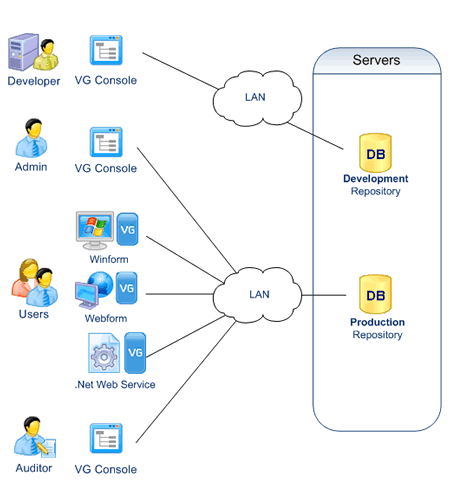
Developers define permissions with the VGConsole.
Permissions are stored in a development repository.
Developers deploy the permissions into production with a VG utility
- Administration
Adlinistrators manage Users and grant them permissions.
They update the VG repository with the VG Console
- Enforcement
End-users log in the .Net application.
The VG runtime queries the VG Repository to verify user identity.
The VG runtime retrieves the user permissions and enforces security by dynamically changing the application.
- Audit
Auditors can control user attributes, roles and priviledges across multiple systems with the VG Console.
They can also review end-users operations.
Notes
- Applications need a direct access to the database, as well as the VG Console.
- Users, Administrators and Auditors can operate from any location with a LAN or Internet connexion