-

-

-
 Make your Applications Compliant
 -
 Secure Multiple ApplicationsManage data access rights across all applications
Control and audit all systems in real time
Secure all type of applications : Desktop, Web, Mobile, SaaS...
Support all development languages: .NET, Java, Javascript, PHP... -
 Security Framework for Application DevelopersAdd security features to your applications














Visual Guard-Kernfunktionen
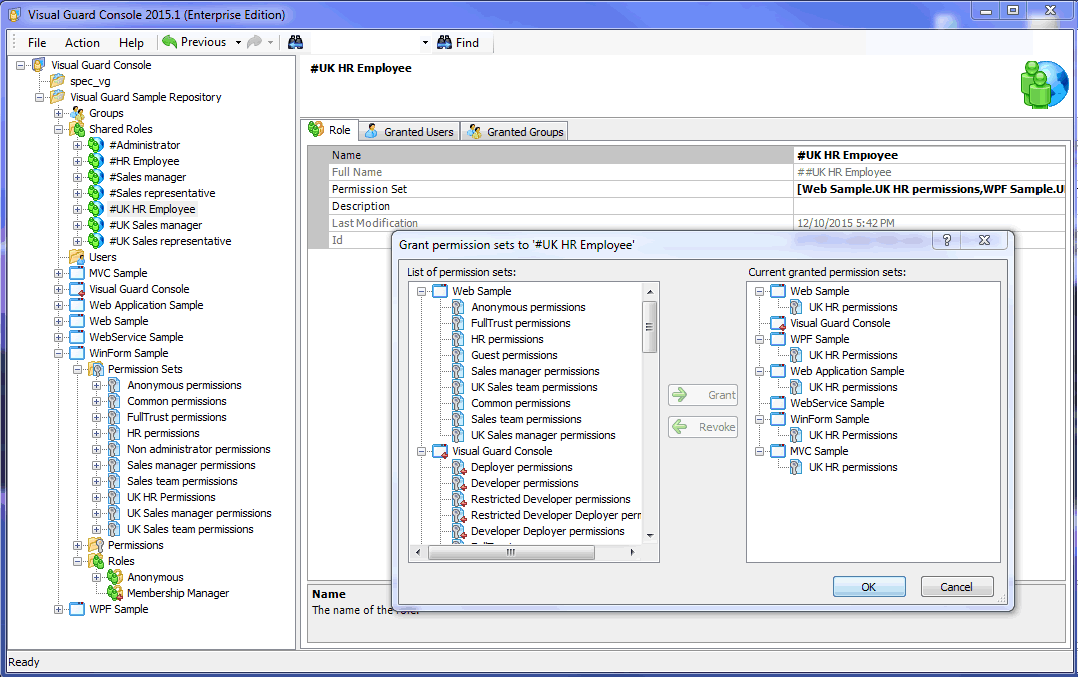
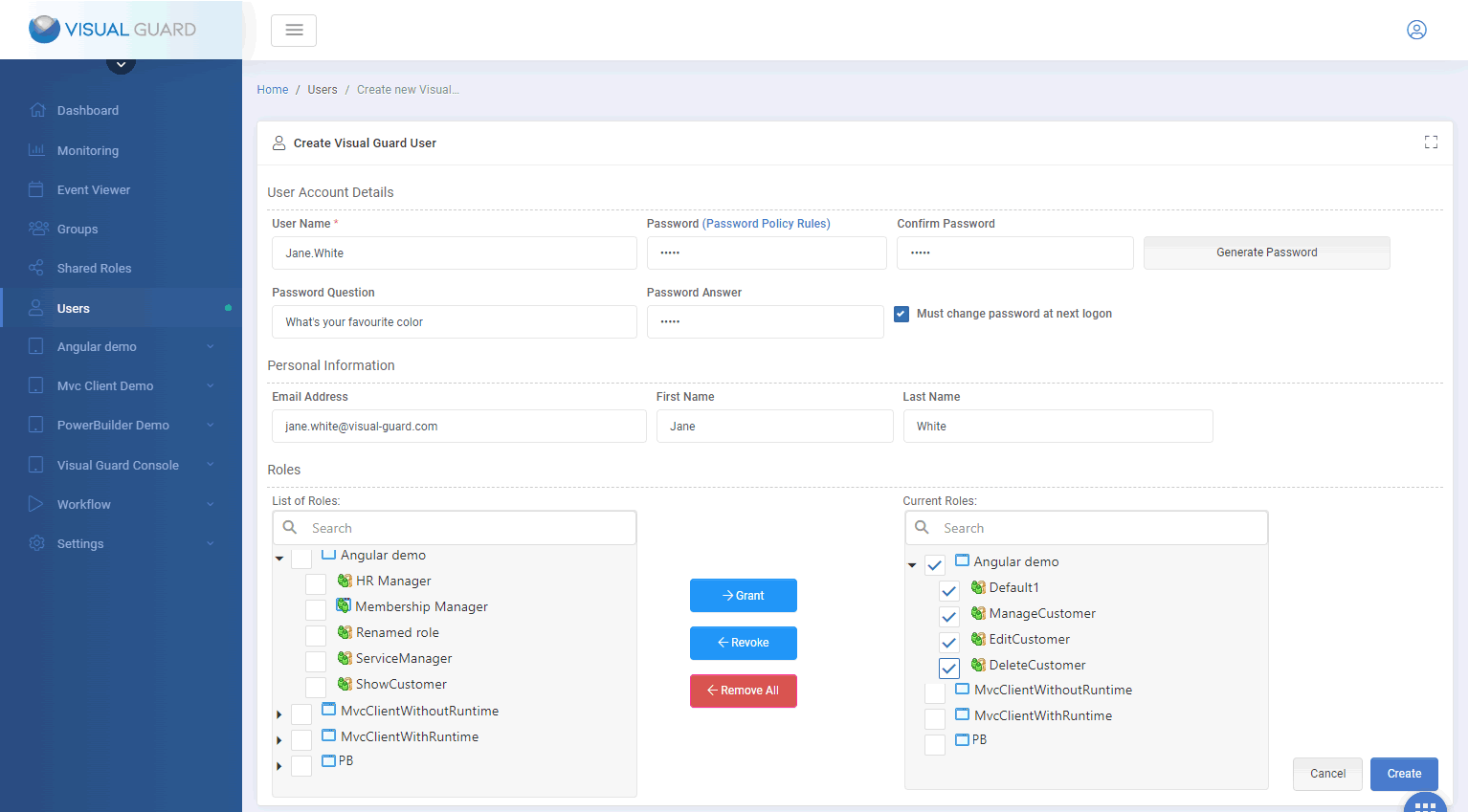
Benutzerberechtigungen
Definieren Sie, auf welche DATEN und FUNKTIONEN Benutzer in Anwendungen zugreifen können. Erteilen Sie Berechtigungen unabhängig vom Programmcode über eine grafische Konsole.
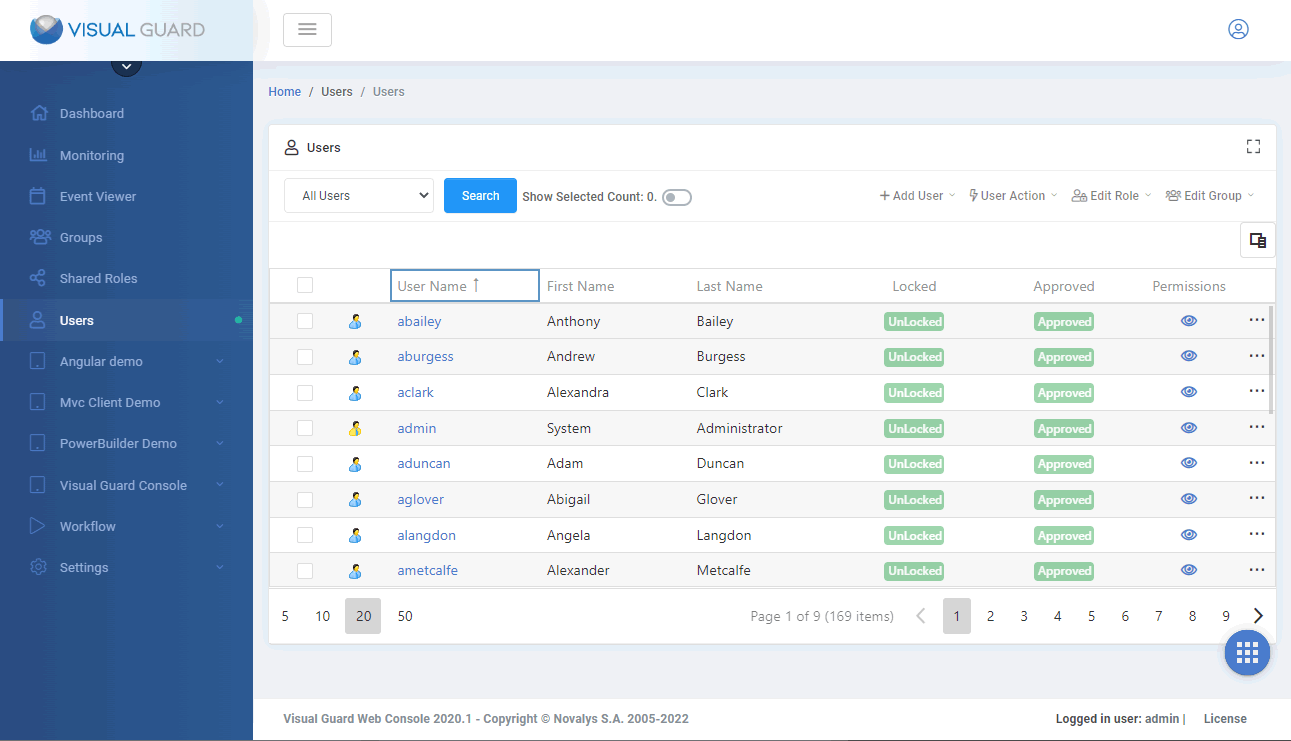
Benutzerverwaltung
Leistungsfähige Funktionen für die Verwaltung von Benutzerkonten; eine benutzerfreundliche Verwaltungskonsole für die Benutzer-Einrichtung und Verwaltung.
Benutzerauthentifizierung
Sofort einsatzbereite Authentifizierungsfunktionen und Integration mit vorhandenen Systemen.
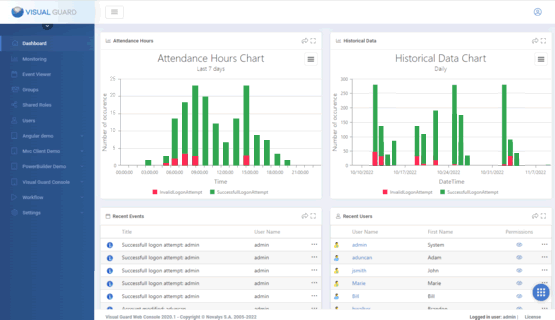
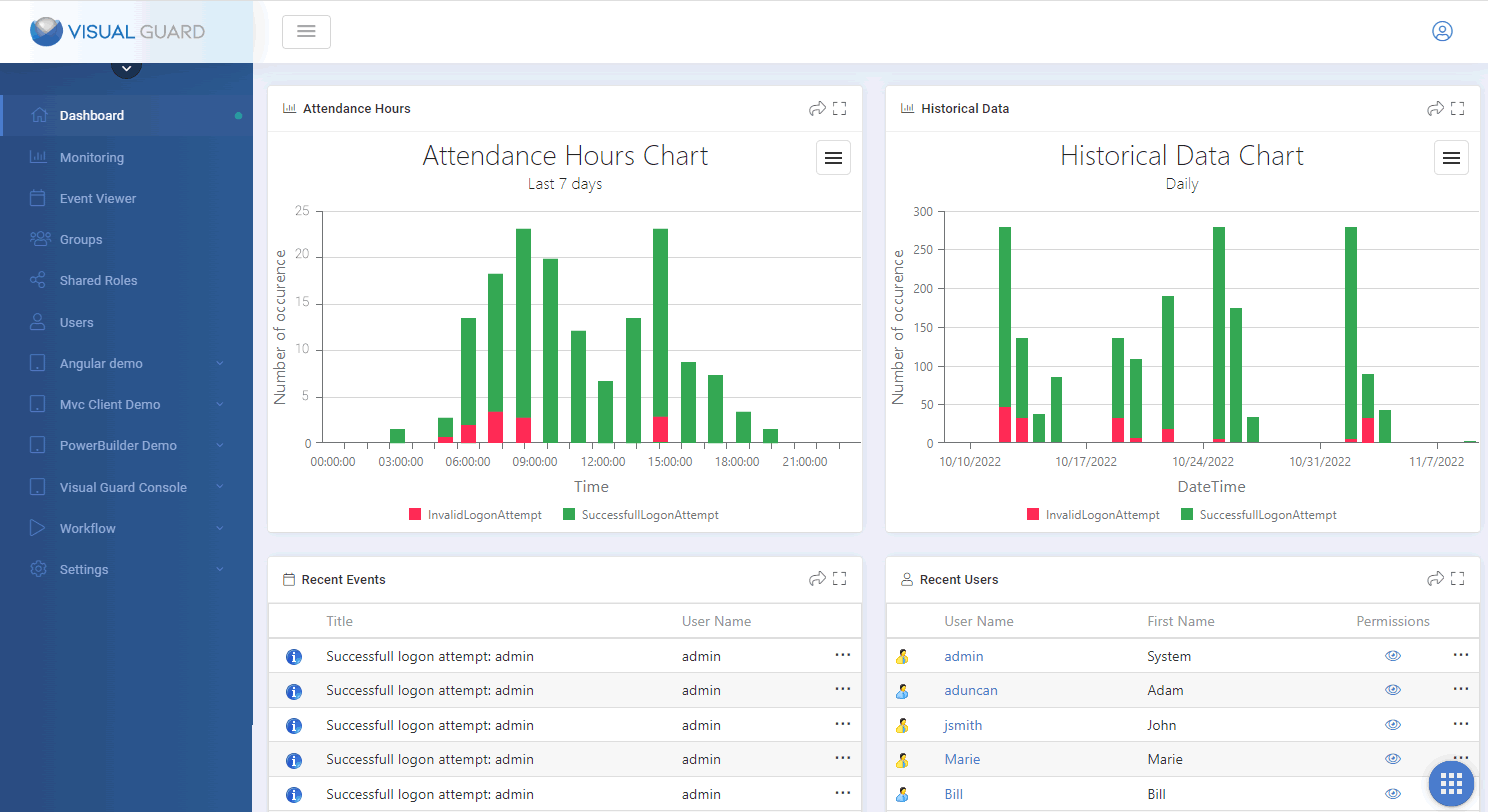
Berichte und Audits
Audit von Zugriffssteuerungs-Berechtigungen, Protokollierung von Operationen.
Warum Visual Guard
Erhöhen Sie Ihre
Anwendungssicherheit
Sofortiges Hinzufügen neuer Sicherheitsfunktionen
- Authentifizierung von Benutzern mit ihrem Windows-Konto
- Einmaliges Anmelden (Single Sign-On)
- Absicherung von SaaS- und mandantenfähigen Anwendungen
- Delegierung täglicher Verwaltungsaufgaben an nichttechnisches Personal und Kunden
- Wiederverwendung vorhandener Benutzerkonten (Facebook, Google usw.)
Zentralisieren Sie das
Sicherheitssystem aller Anwendungen
Ersetzen Sie spezielle Sicherheitssysteme für einzelne Anwendungen mit einer einzigen Lösung
- Erhalten Sie eine globale Übersicht der Benutzer und Zugriffsrechte über Ihr gesamtes Anwendungs-Portfolio.
- Automatisieren Sie die Kontrollen und Prüfungen aller Anwendungen.
- Pflegen Sie nur eine einzige Sicherheitslösung.
Einhaltung von Vorschriften und Standards
Sicherheitsregeln leicht gemacht
- SOX, HIPAA, ISO...
- Protokollieren Sie alle Aktionen von Benutzern und Administratoren: Wer tat was? Wann? Wer autorisierte das?
- Fokuskontrollen für einzelne Benutzer, Operationen, Tage oder Anwendungen
DSGVO Konformität für Geschäftsanwendungen
Sie haben von der DSGVO gehört, aber sind möglicherweise nicht sicher, ob Ihre Anwendungen betroffen sind. Müssen Änderungen vorgenommen werden? Falls ja, wie müssen diese erfolgen?
.NET-Sicherheits-Framework
Visual Guard bietet eine erweiterte API (mit über 300 Methoden) für die Integration von VG-Features in Ihre Anwendungen
Benutzer verwalten
- VG-Benutzerkonten erstellen / lesen / aktualisieren / löschen
- Attribute von VG-Benutzerkonten bearbeiten
- Active Directory-Konten in VG deklarieren
- Kennwortrichtlinien definieren
- Eigenanmeldungen von Benutzern verwalten
Berechtigungen verwalten
- Berechtigungen, Berechtigungssätze und Rollen erstellen / lesen / aktualisieren / löschen
- Berechtigungen zu / von Berechtigungssätzen hinzufügen / entfernen
- Berechtigungen zu / von Rollen hinzufügen / entfernen
- Benutzerrollen zuweisen / entziehen
- Rollen von Active Directory-Konten zuweisen / entziehen
Sicherheit durchsetzen
- Authentifizierung von Benutzern (Windows-Authentifizierung, Anmeldeformular, SSO usw.)
- Kennwortverwaltung (Änderungen durch Benutzer, Zurücksetzen, vergessene Kennwörter …)
- Laden und Anwenden von Benutzerberechtigungen
- Winform-, WPF-, Webform-, MVC-, Webdienste- und WCF-Unterstützung
Das Rad nicht neu Erfinden
Warum Monate oder Jahre mit komplexen Entwicklungen verbringen, wenn Sie einfach eine gebrauchsfertige Lösung mit komplettem Funktionsumfang einsetzen können?
Wir sorgen dafür, dass Ihre Sicherheitsstandards und Technologien auf dem neuesten Stand bleiben. Wir unterstützen Sie bei der Entwicklung, Bereitstellung und Konfiguration Ihrer Systeme.
20 Jahre Know-how in der Anwendungssicherheit
Visual Guard wurde ursprünglich in den 1990er-Jahren für eine große europäische Bankengruppe entwickelt. Seitdem wird es ständig für die aktuellen Sicherheitsanforderungen weiterentwickelt. Es wird heute weltweit von mittelständischen und großen Unternehmen sowie vielen Softwareanbietern eingesetzt.
BERATUNG - HILFE - SUPPORT
Novalys kann Ihnen bei der Umsetzung Ihrer Anwendungssicherheit helfen. Unser Team bietet folgende Dienstleistungen:
Funktionelle und technische Spezifikationen
Analyse vorhandener Anwendungen, Befragung von Benutzern für Sicherheitsregeln, Definition und Zuweisung von Berechtigungen und Benutzerrollen, Definition und Aufteilung von Administrationsrechten, Vorschläge für eine globale oder lokale Organisation der Anwendungssicherheit.
Entwicklung
Integration von Visual Guard in Ihre Anwendungen, Sicherung komplexer Objekte (Webdienste, Klassen, usw.), Entwicklung spezieller Komponenten oder Anpassung von Visual Guard-Komponenten zur Realisierung komplexer funktioneller und technischer Spezifikationen.
Produktion
Installation und Konfiguration von VG mit ADFS, Installation und Konfiguration von Web-SSO mit Visual Guard, Erstellung eines Bereitstellungsverfahrens für die Sicherheit in Produktivumgebungen.
Support
Profitieren Sie von einheitlichen und reibungslosen Abläufen – von der Implementierung bis hin zur Produktion – mithilfe des Visual Guard Professional Support Teams.

„Vor- und Nachverkaufskundendienste können sehr unterschiedliche Dinge sein ... Ich hatte dank Anne eine sehr einheitliche Erfahrung“
„Der Support von Novalys war hervorragend und sehr schnell“
Eininge Kunden von Visual Guard
Visual Guard ist im Einsatz bei Hunderten von bedeutenden Unternehmen in Branchen wie Banken, Finanzen, Versicherungen, Behörden usw.









Rüclmeldungen unserer Kunden

Vollständige und zuverlässige IAM-Lösung
Einfacher, robuster und vollständig ausgestatteter Client
Professionelle Unterstützung
Der Support von Novalys war hervorragend und sehr schnell.
Trennung von Sicherheitsentwicklung und täglicher Verwaltung
Dank der Verwaltungskonsole (und den zur Verfügung stehenden Rollen) ist es sehr einfach, die Erstellung von Rollen und Benutzerkonten an Administratoren im Unternehmen zu delegieren und die Aufgaben zwischen dem Entwicklungsteam und den Administratoren zu teilen.
Zentralisierte Sicherheit
Der wichtigste Vorteil von VG ist für uns ist die zentrale Verwaltung von Anmeldungen und Berechtigungen für das gesamte Unternehmen
Zeitersparnis
Die primäre Aufgabe eines Arztes ist die Behandlung von Patienten, nicht von Kennwörtern [...] Ich spare sicher 50 % der Zeit bei lästigen Aufgaben wie dem Zurücksetzen von Kennwörtern